
Why Your Photos Deserve Better Than Digital Chaos
Let’s face it: that camera roll is likely a digital disaster zone. You’re definitely not the only one! We live in a time where a single weekend getaway can produce more photos than our grandparents took in their entire lives. The old “shove everything into one folder” method just doesn’t cut it anymore.
This surge in smartphone photography presents some serious organizational hurdles. Think about it: we’re snapping pics of everything – from stunning sunsets to that delicious-looking lunch. Capturing those moments is a breeze, but managing the resulting digital mountain? That can get overwhelming fast.
The Growing Need for Digital Photo Organization
This isn’t just a casual observation. The sheer quantity of digital images generated daily points to a critical need for effective digital photo organization. Get this: the global digital photography market reached a staggering $53.14 billion in 2024 and is set to hit $56 billion by 2025. That’s a CAGR of 5.4%! This growth, driven by powerful smartphone cameras, social media platforms like Instagram, and wider internet access, indirectly boosts the demand for digital photo organization tools. Want to dive deeper? Check out this report here. This explosion in digital photography highlights the urgent need for simple, efficient organizing solutions. Without a system, precious memories can vanish in the digital flood.
From Chaos to Curated Collections: Real-Life Examples
Plenty of people have successfully tamed their photo chaos and built systems that actually work. Imagine a busy parent instantly finding the perfect photo for a school project, or a photography enthusiast effortlessly creating themed collections to share. These are the real, tangible benefits of getting your digital photos organized.
Protecting Your Precious Memories
Perhaps the most compelling reason to organize your digital photos is to safeguard those precious memories. A hard drive crash, a lost phone, or just the relentless march of time – all of these can lead to the permanent loss of irreplaceable photos. Organizing your photos isn’t just about digital housekeeping; it’s about preserving your visual history for future generations. By setting up a reliable organization system, you’re ensuring that these treasured moments are safe, sound, and easily accessible for years to come.
Building Your Digital Photo Organization Foundation
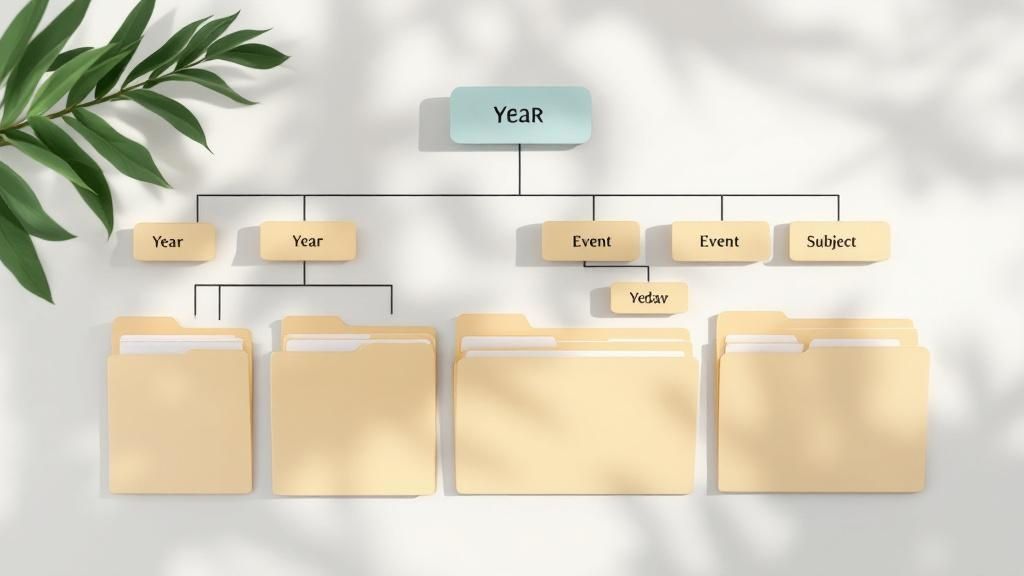
Effective digital photo organization isn’t about purchasing the newest software. It’s about building a rock-solid foundation, a system you can easily maintain and actually enjoy using. Think of it as building a beautiful, organized home for all your precious memories! This section will guide you in creating that foundation, covering everything from setting up smart folder structures to developing reliable backup strategies.
Creating a Folder Structure That Stands the Test of Time
A well-structured folder system is the backbone of any successful digital photo organization plan. Think of it as your personalized roadmap to your memories! Instead of tossing everything into one giant, overwhelming folder, create a structured hierarchy. Design a system that mirrors how you naturally think about your photos. This could be organized by year, then by event, or maybe by location and then date.
- Year > Event > Date: Imagine effortlessly finding pictures from your 2024 family vacation by navigating to 2024 > Family Vacation > 2024-07-15.
- Location > Date > Event: Or perhaps you prefer searching by location. You could find photos from your Eiffel Tower visit by going to Europe > 2024-07-15 > Eiffel Tower Visit.
The secret to success? Consistency. Pick a system and stick with it like glue! Trust us, your future self will thank you for those few extra seconds spent organizing now.
Naming Conventions That Work For Your Brain
Just as important as your folder structure are consistent naming conventions. These add an extra layer of searchability and prevent headaches later on. Think of them as the detailed labels on the boxes in your perfectly organized home. Choose a method that clicks with your brain and stick to it!
- Date + Event: Crystal clear and easy to follow. Imagine searching for 20240715-BeachDay and instantly finding all those sunny snapshots.
- Event + Location: Another great option! Searching for BirthdayParty-Grandma’sHouse will bring up all the heartwarming moments from that special day.
Steer clear of confusing abbreviations or random numbers – clarity is your best friend.
Backup Strategies to Prevent Disaster
Losing all your digital photos? Unimaginable! Luckily, it’s easily preventable with a smart backup strategy. The golden rule? The 3-2-1 rule. This means having 3 copies of your precious photos on 2 different media, with 1 copy safely stored offsite.
- Primary Storage: Your computer’s hard drive is your first line of defense.
- Secondary Storage: Add an extra layer of security with an external hard drive or a Network Attached Storage (NAS) device.
- Offsite Backup: Think cloud storage like iCloud, Google Photos, or another dedicated backup service. This protects you against physical disasters like fire or theft.
Multiple backups guarantee your memories stay safe, no matter what. Interested in learning more? Check out this helpful article: How to master digital memory keeping.
Workflows That Fit Your Lifestyle
The best digital photo organization system is one you can maintain effortlessly. That means creating workflows that integrate seamlessly into your life. Think about when and how you’ll transfer photos from your phone or camera to your computer. How often will you go through and organize them? And how will you keep those backups up-to-date? Small, consistent actions are the key to long-term success! By building habits that align with your daily routines, you’ll keep your digital photo collection beautifully organized with minimal effort.
Finding Your Perfect Photo Management Software
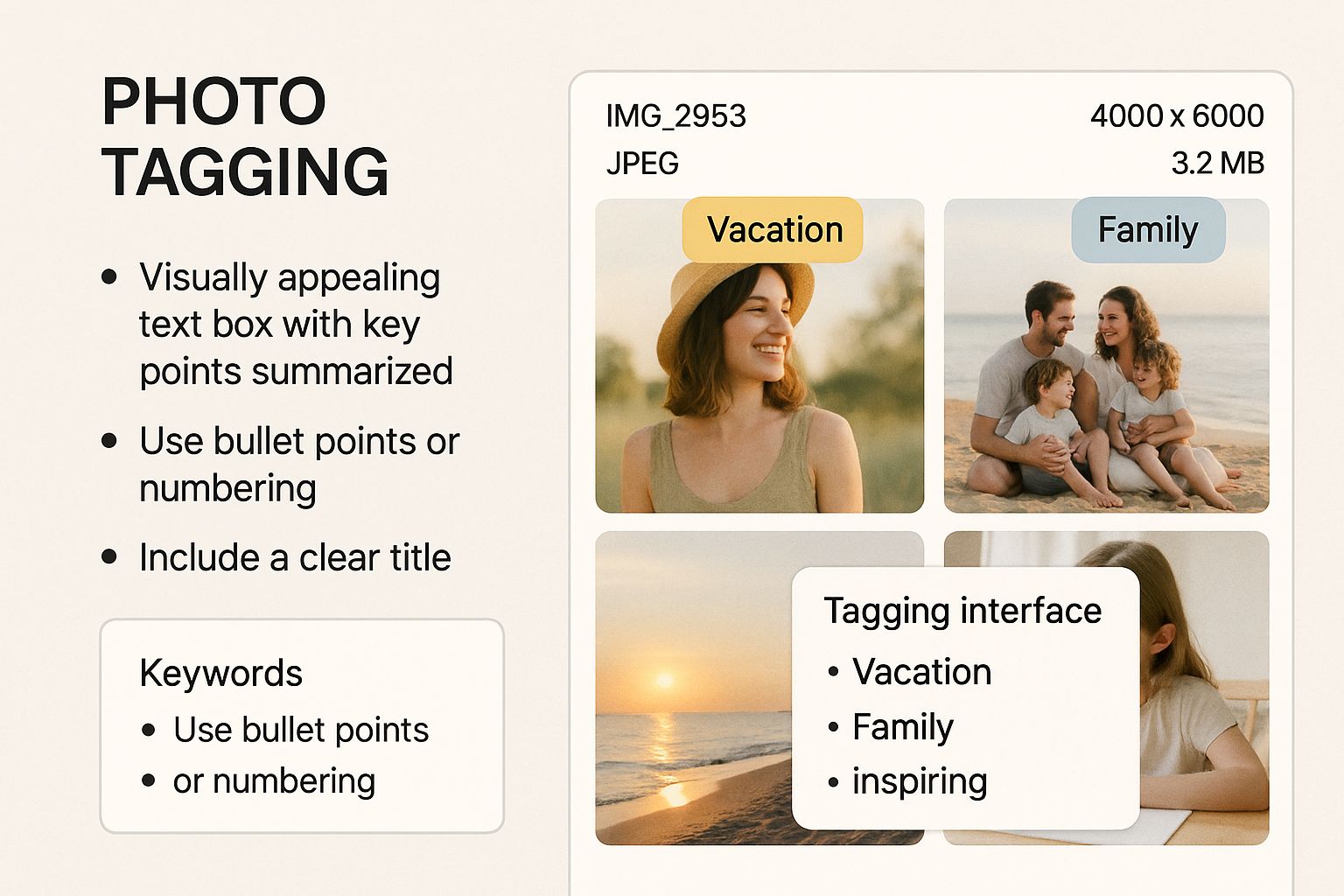
This infographic showcases a brilliant way to visualize your photo collection! Imagine a digital grid where your photos are neatly arranged, and tags like “Vacation” and “Family” appear right over them. That’s the power of photo management software! This visual organization makes it incredibly easy to find and categorize your photos, so you can quickly rediscover and enjoy those special memories without endless scrolling.
Choosing the right photo management software can feel like navigating a maze. With countless options available, it’s easy to get bogged down in technical terms and marketing hype. This section will help you cut through the confusion and zero in on what really matters in digital photo organization software. We’ll explore essential features, compare top platforms, and help you discover the perfect fit for your specific needs.
Key Features to Consider
Not all photo management software is created equal. Some features are truly game-changers, while others might seem fancy but end up gathering dust. Here are the must-have features to keep an eye out for:
- Tagging and Keywording: Add descriptive words to your photos for easy searching. Imagine tagging photos with “Birthday,” “Paris,” or “John” and instantly finding those memories!
- Facial Recognition: This nifty feature automatically identifies people in your photos and groups them together, making browsing a breeze.
- Cloud Storage Integration: Seamless integration with cloud services like iCloud or Google Drive ensures your photos are safely backed up and accessible from anywhere.
- Editing Capabilities: Built-in editing tools can save you time and the hassle of switching between programs.
- Album Creation: Create personalized albums to organize photos based on events, dates, or any criteria you choose.
- User-Friendliness: The software should be intuitive and easy to use, even for those who aren’t tech-savvy.
Comparing Popular Platforms
To help you get a clearer picture, let’s compare some popular photo management software options:
To help you choose the right software, we’ve put together a comparison table:
Photo Management Software Comparison: Compare features, pricing, and suitability of popular photo management platforms for different user needs
| Software | Price | Storage | Key Features | Best For |
|---|---|---|---|---|
| Adobe Lightroom | Paid subscription | Adobe Creative Cloud, Local Storage | Advanced editing, professional organization tools, RAW file support | Serious photographers, professionals |
| Google Photos | Free and paid options | Google One, Local Storage | Cloud storage, AI-powered features, sharing capabilities | Casual users, mobile photographers |
| Apple Photos | Free with Apple devices | iCloud, Local Storage | iCloud integration, basic editing, seamless Apple ecosystem integration | Apple users, simple organization needs |
This table summarizes the key differences between these popular platforms, helping you decide which one best suits your needs. Each offers a unique blend of features, storage options, and pricing.
Matching Software to Your Needs
The ideal photo management software depends on your individual circumstances. Consider these factors:
- Photo Volume: Do you have a massive photo library or a smaller, more manageable collection?
- Technical Skills: Are you comfortable with complex software, or do you prefer something simple and straightforward?
- Budget: Are you open to paying for a subscription, or are you looking for a free solution?
- Specific Needs: Do you prioritize advanced editing features, cloud storage, or particular organizational tools?
The photo management software market is booming! In 2024, its global value was approximately $1.66 billion, and it’s projected to skyrocket to $3.55 billion by 2033. This incredible growth underscores the increasing demand for efficient digital photo organization tools. Learn more about this exciting trend here. By carefully considering your individual needs and exploring the available options, you can discover the perfect software to conquer your photo chaos and cherish your precious memories for years to come.
Tackling Years of Photo Chaos Without Losing Your Mind
Staring at a mountain of digital photos from years past can be overwhelming. Where to even begin? Don’t worry! Turning that digital mess into a well-organized, enjoyable collection is totally doable. This section gives you a practical guide to conquer photo chaos and build a system that works for you.
Starting Smart: Bulk Actions for a Quick Win
One of the first steps is bulk sorting. Instead of going through each photo individually, sort them by date, event, or the device they were taken on (like your phone or camera). Many photo management programs like Adobe Lightroom offer this, saving you tons of time. Next, tackle duplicate photos. Tools like Duplicate Cleaner can automatically find and remove duplicates, freeing up precious storage space. This initial cleanup lays a strong foundation for further organizing.
Making the Cut: Choosing Your Keepers
With duplicates gone, it’s time to make some decisions. You don’t need to keep every single photo. Think about these points when deciding what’s worth saving:
- Quality: Is the photo blurry, dark, or technically flawed?
- Emotional Value: Does this photo bring back happy memories or strong feelings?
- Uniqueness: Do you have other, better photos of the same moment?
- Subject Matter: Is the photo of something important or meaningful to you?
Using these criteria, you can confidently delete unnecessary photos, making your collection easier to manage and more meaningful.
Wrangling Different Formats and Devices
Most of us take photos with multiple devices, creating a mix of JPEGs, RAW files, HEICs, and other formats. A good digital photo organization system needs to handle all these. Consider converting less common formats to a standard like JPEG for simple sharing and viewing. Next, consolidate photos from all your devices to a central hub – whether it’s your computer, an external hard drive, or cloud storage like Google Photos. This makes backing up and organizing much easier, ensuring you can access all your photos from one spot. Check out this helpful resource: How to master a photo journal app.
Staying Motivated and Setting Realistic Goals
Organizing a massive photo collection can feel daunting. Break the project down into smaller, more manageable pieces. For example, organize one year or one event at a time. Set achievable goals and celebrate your progress. Even 15-30 minutes a day can make a real difference. Remember, the hardest part is starting. By using these strategies and staying consistent, you’ll be well on your way to a beautifully organized photo collection.
Bringing Physical Photos Into Your Digital System
Those dusty boxes overflowing with printed photos hold a treasure trove of memories. But they’re also vulnerable to fading, damage, and even loss! This section explores how to efficiently bring those precious physical photos into your digital photo organization system, creating lasting digital copies without the project becoming overwhelming. We’ll cover everything from scanning methods to seamlessly integrating these digitized memories into your current digital setup.
Scanning Techniques: Balancing Quality and Speed
Digitizing physical photos involves a crucial trade-off: quality versus speed. Flatbed scanners offer excellent image quality and are perfect for fragile photos. However, scanning each photo individually can be time-consuming. For faster processing, consider a photo scanner designed specifically for photos and slides. While the image quality might be slightly lower than a flatbed scanner, the speed can be a game-changer. Alternatively, smartphone apps provide a surprisingly convenient option, particularly if you only need quick digital copies for sharing on social media or via email.
Handling Different Sizes and Conditions
Photos come in all shapes and sizes, from small wallet prints to large framed portraits. Flatbed or photo scanners work best for standard sizes. But what about those oversized prints? Professional scanning services might be the ideal solution. Don’t forget about damaged photos! Carefully assess their condition. Minor imperfections can usually be fixed with photo editing software like Adobe Photoshop. Severely damaged photos, however, could benefit from professional restoration before scanning.
Preserving Dates and Context
Digitizing your photos is about more than just the image; it’s about preserving the memories! As you scan, take the time to record essential details. Write down dates, locations, the names of people in the picture, and any stories connected to the image. These details provide invaluable context, transforming your digital collection into a rich family archive. A spreadsheet or a dedicated photo organization tool can be a great way to store this information, linking it to the corresponding digital files.
Professional Digitizing Services: When to Consider Them
DIY scanning works well for many, but sometimes outsourcing is the best choice. If you have a huge collection, delicate originals, or are short on time, consider professional digital photo scanning services. This rapidly growing market was valued at $367.5 million in 2025 and is expanding as more and more people want to preserve their family history. Learn more about this growing industry here. These services use specialized equipment and expertise to handle various formats and conditions, giving you high-quality digital copies of your precious memories.
Integrating Digitized Photos Into Your System
Once digitized, seamlessly integrate these new photos into your current digital photo organization system. Maintain consistency by using the same folder structure, naming conventions, and tagging practices you use for your other digital photos. This makes it much easier to search, browse, and enjoy your entire photo collection, regardless of whether the photos were originally digital or came from physical prints.
Advanced Organization Techniques That Actually Save Time

Once you’ve got the basics of digital photo organization down, you can start exploring ways to really boost your efficiency. This section explores advanced techniques that practically make organizing your photos effortless! We’ll look at everything from using the amazing power of AI to connecting all your digital platforms for a seamless photo experience.
AI-Powered Tagging and Facial Recognition
Imagine software that not only recognizes faces in your pictures but also suggests tags like “beach,” “birthday,” or “dog.” That’s the magic of AI-powered tagging! These intelligent algorithms analyze your photos, identifying objects and scenes to suggest perfect keywords, saving you tons of time and effort. Advanced facial recognition takes it a step further. It learns who’s who in your life, automatically grouping photos by individual, making browsing your collection a breeze.
Smart Albums and Automated Sorting
Modern photo management software like Adobe Lightroom offers smart albums. These albums automatically fill up based on rules you set. For example, create a smart album for all photos taken with your iPhone, tagged with “vacation,” and featuring your family. This automation works perfectly with automated sorting algorithms that learn your preferences as you go, sorting new photos into the right folders or albums.
Leveraging Metadata for Advanced Searches
Metadata is the hidden information about your photos—things like the date taken, camera model, and location. Many photo management programs let you search using this metadata. This means you can instantly find photos taken on a specific date, with a particular camera, or even at a specific GPS location. Imagine searching for all photos taken in Paris with your DSLR in July 2024—easy!
Integration With Cloud Storage and Social Media
Seamless integration with cloud storage services like Google Photos or iCloud ensures your photos are backed up and accessible from anywhere. Plus, integration with social media platforms makes sharing your organized collections simple. Some photo management software can even automatically download photos you’ve shared online, keeping everything in one central, organized place.
Let’s take a look at how these different organizational methods stack up against each other:
To help illustrate the effectiveness of various organization methods, the following table summarizes the time investment, long-term savings, difficulty level, and suitability of each approach.
Organization Methods Effectiveness
| Method | Time Investment | Long-term Savings | Difficulty Level | Recommended For |
|---|---|---|---|---|
| Manual Folders | High | Low | Easy | Small photo collections |
| Basic Tagging | Medium | Medium | Easy | Casual photographers |
| AI-Powered Tagging | Low | High | Medium | Large photo collections |
| Smart Albums | Medium | High | Medium | Frequent photo organizers |
| Metadata Search | Low | High | Medium | Specific photo retrieval |
| Cloud Storage Integration | Low | High | Easy | Everyone |
| Social Media Integration | Low | Medium | Easy | Active social media users |
As the table shows, leveraging AI and automation features offers substantial time savings in the long run, while manual methods can quickly become cumbersome for large collections. Choosing the right method depends on your specific needs and tech comfort level. But regardless of your chosen approach, organizing your photos is an investment worth making!
Keeping Your Photo System Organized For The Long Haul
Organizing your photos isn’t a one-time project; it’s a continuous journey of preserving precious memories. This section dives into practical, sustainable strategies for maintaining your digital photo organization system without it becoming overwhelming. We’ll explore setting up manageable routines, efficiently handling the influx of new photos, and adapting your system as your needs and technology evolve.
Establishing Realistic Maintenance Routines
The secret to long-term success with digital photo organization lies in creating sustainable habits. Think small, consistent actions instead of massive, infrequent overhauls. Just like daily tidying prevents a messy home, regular maintenance keeps your photo collection manageable. Set aside just 15 minutes each week to organize new photos. Alternatively, schedule monthly backups to an external hard drive or a cloud storage service like Dropbox. These small, consistent actions prevent your photos from becoming an unmanageable mountain.
Handling the Influx of New Photos
New photos constantly flood our digital lives. Developing a streamlined system for handling them is essential. As soon as you transfer photos to your computer, take a few minutes to tag them with relevant keywords, such as “Vacation,” “Family,” or “Birthday.” Then, file them into your established folder structure. This proactive approach prevents a backlog of unorganized photos. It’s like putting away groceries after shopping – a little effort upfront saves you significant time and hassle later! For more travel-related tips, check out this insightful article: How to master travel journaling with an app.
Adapting to Evolving Needs and Technology
Just as life changes, so do our digital photo organization needs. Perhaps you’ve upgraded your computer, switched to different photo management software like Adobe Lightroom, or your family has grown. Regularly review and adjust your system accordingly. Think of it like reorganizing your closet as your wardrobe evolves. It’s about ensuring your system remains effective. Maybe your current folders need restructuring, or perhaps you need to add new tags to reflect new events or hobbies. By staying flexible and adapting, you ensure your system remains a valuable tool for managing and enjoying your photos.
Staying Consistent: Motivation and Troubleshooting
Staying motivated can be tough. One trick is to visualize the rewards of an organized photo collection. Imagine effortlessly finding the perfect photo for a holiday card, creating a slideshow for a family gathering, or simply reminiscing without frustration. These positive visualizations can fuel your commitment to digital photo organization.
You’re bound to encounter challenges. Maybe you’ve fallen behind on your routine, or you’re unsure how to handle photos from a large event. Don’t let setbacks discourage you. Break down the task into smaller, more manageable chunks, seek advice from online photography communities, or explore specialized photo organization tools. Remember, progress, not perfection, is the goal.
Preparing Your Collection for Future Generations
Consider your digital photo organization system not just as a personal tool, but as a legacy. By carefully curating, organizing, and preserving your photos, you’re creating a priceless family archive. Ensure your system is user-friendly and easy to navigate. Consider adding detailed captions or stories to your photos, providing context for future generations. This extra effort transforms your photos into a treasured family heirloom.
Ready to transform your travel memories into a beautifully organized journal? Explore Acti, the intuitive iOS app that automatically logs your visits and helps you effortlessly document your adventures.
Leave a Reply