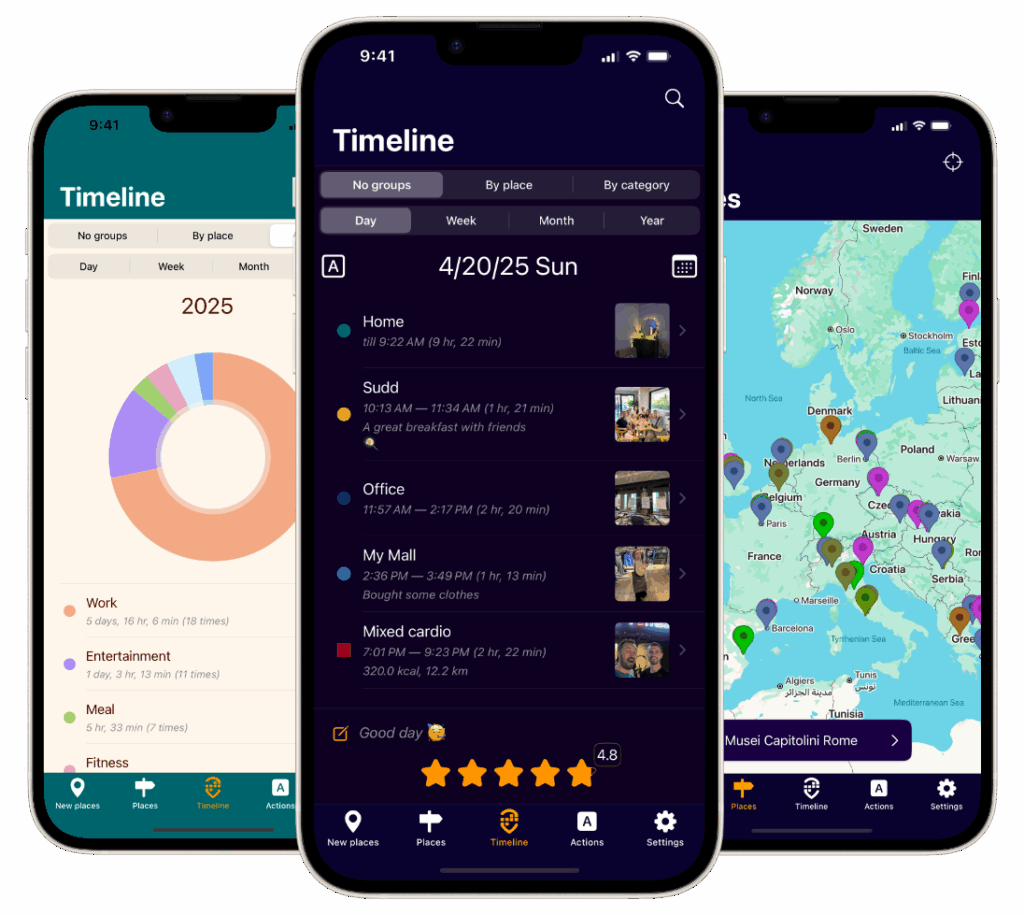
Everyone loves to ask, “Where have u been?” Whether it’s a friend catching up after a busy month or a colleague curious about your latest trip, the answer is often scattered across photos, receipts, and fading memories. Imagine having a clear, beautiful timeline of your visited places—complete with photos and comments—ready whenever you want to remember, share, or reflect. That’s exactly what Acti delivers: an iOS travel tracker and life journal that automatically builds your story of places.
Why “Where Have U Been” Matters More Than You Think
Places are the anchors of our memories. The café where you closed a deal, the park where your kid took their first bike ride, the beach you stumbled upon at sunset—each spot holds meaning. A simple location history becomes powerful when it’s connected to context: what you did there, how it felt, and what you want to remember later. “Where have u been” isn’t just a question about geography; it’s a question about your life.
Yet most of us rely on manual notes or loosely organized photos to reconstruct our days. This creates friction and gaps. A more natural way is to let your phone do the heavy lifting—then you add the color through photos and comments. That’s the promise of Acti.
Meet Acti: Your Automatic Travel Tracker and Life Journal
Acti is an iOS app that automatically builds a timeline of the places you visit and enriches them with your photos and comments. Instead of manually checking in or writing lengthy entries, you get an effortless, chronological record of your journeys—from daily routines to once-in-a-lifetime trips. When someone asks, “Where have u been?” you can scroll through a living map of your life, each stop brought to life with images and notes.
Key benefits include:
- Automatic timeline of visited places, so you never miss a moment
- Photos and comments attached to each place for vivid, personal context
- A clear, organized travel journal you can revisit anytime
How It Works in Real Life: Practical Examples
Acti fits seamlessly into your day. Here’s what it looks like in action:
- Commute and coffee: You stop at your favorite café on the way to work. Acti logs the visit automatically. While you sip, you add a quick comment: “Tried the new seasonal blend—loved it.” Snap a photo of the latte art, and your morning is saved as a small, delightful memory.
- Weekend getaway: You drive to a coastal town, visit a lighthouse, explore a local market, and end the day at a seafood spot. Acti captures your stops as a timeline. You attach photos of the lighthouse view and add a note about the hidden bakery stall that sold the best croissants.
- Business trip: Between meetings, you discover a great lunch spot and a quiet park. Add a comment like, “Perfect place to prep for the afternoon session,” and a photo of your favorite dish. Later, when planning a return visit, your personal recommendations are at your fingertips.
This simple loop—automatic place logging plus quick, personal enrichment—turns scattered experiences into a cohesive, searchable story.
Actionable Tips to Get the Most from Acti
- Start with the essentials: After installing Acti on your iPhone, open the app and follow the prompts to enable location access. This ensures your timeline of visited places is captured automatically.
- Add context while it’s fresh: After a stop, spend 30 seconds adding a comment. Note who you were with, what you did, and why it mattered. These details make the memory far more valuable later.
- Let photos do the storytelling: Attach one or two meaningful images. A single, well-composed photo per place beats a large, uncurated gallery.
- Use consistent phrasing: In your comments, repeat helpful cues like “workout,” “client meeting,” or “date night.” This makes future browsing more intuitive.
- Review weekly: Set aside five minutes on Sunday to scroll through your week. Add any missing notes and mark standout places you want to revisit.
- Create thematic highlights: As you review, jot down short highlights like “Top three coffee shops this month” or “Best sunset spots.” These mini-summaries make sharing recommendations quick and fun.
- Mind your settings: If you ever need to adjust location permissions, you can do so in your iOS settings. Choose the level of access that matches your needs.
Who Benefits Most: From Travelers to Everyday Explorers
Acti is perfect for avid travelers, but it’s just as helpful for everyday life:
- Travelers: Keep a tidy log of every city and attraction, enriched with photos and comments that capture each day’s highlights.
- Foodies: Remember exactly where you tried that incredible ramen, plus your notes on what to order next time.
- Professionals: Track client visits and conference days, adding quick context that helps with follow-ups and trip reports.
- Families: Chronicle parks, museums, and weekend adventures so you can relive milestones and plan repeat visits.
- Students: Record study spots, campus resources, and local discoveries for a personal guide to your city.
In each case, the combination of an automatic timeline with photos and comments transforms “where have u been” from a vague recollection into a trustworthy, vivid record.
Why This Approach Works
Consistency and low friction are the secret. Manual journals often fail because they demand too much effort in the moment. Acti captures the where automatically, and you add the why with quick notes and photos. That balance keeps your habit sustainable and your memories rich—without turning journaling into a chore.
Start Your Timeline Today
The next time someone asks, “Where have u been?”, imagine scrolling through a clear, beautiful timeline that answers the question instantly.
Install Acti on your iPhone, enable location access, and let your travel tracker start building your life journal in the background. Add a few photos and comments along the way, and watch your history come alive—one place at a time.
Ready to remember more and forget less? Open Acti, take your first step outside, and let your story write itself.
Leave a Reply