The best souvenir isn’t something you can buy—it’s the map of memories you create along the way. A well-crafted traveller map turns scattered moments into a clear, visual story of where you’ve been and what you’ve experienced. If you’re looking to map your travels with minimal effort and maximum impact, Acti for iOS offers a smart, automatic way to build a timeline of visited places enriched by photos and comments.
What Is a Traveller Map—and Why It Matters
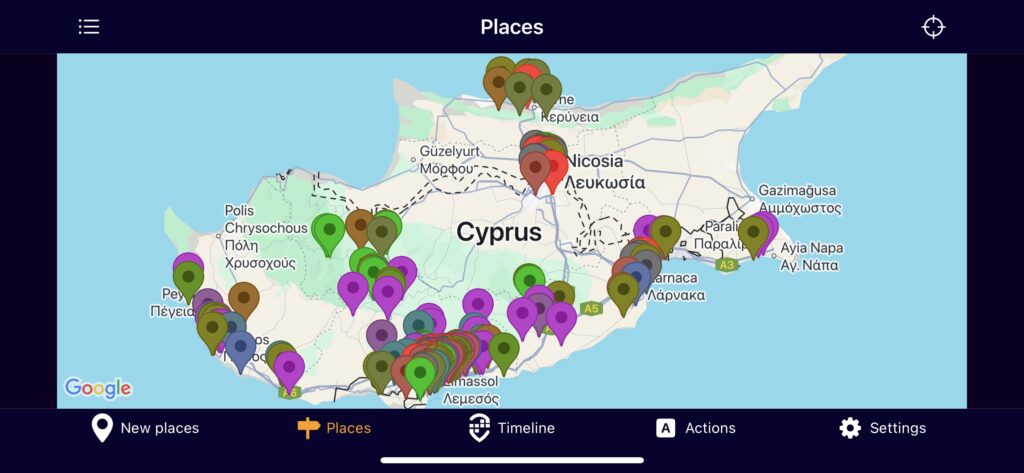
A traveller map is more than pins on a screen. It’s a dynamic record of your journeys: the cities you explored, the coffee shops you loved, the hikes that took your breath away. Done right, it captures context—the who, what, when, and why behind each stop—so your past trips stay vivid and useful for future planning.
With a modern travel tracker, your traveller map becomes a living document. Instead of manually logging every stop, you can focus on savoring the experience while your app quietly notes places you visited. Later, you layer in photos and reflections, transforming raw location history into a polished travel journal.
Key Benefits of a Digital Traveller Map
Why invest in a traveller map? Because it elevates every stage of travel:
- Memory and meaning: Anchor memories to real places and moments, making trips easier to recall and share.
- Planning and discovery: Spot patterns in your travels—neighborhoods you frequent, distances you prefer—to plan smarter next time.
- Storytelling: Share a coherent trip narrative rather than an unorganized photo dump.
- Personal growth: See how your interests evolve over time—from museums to mountains to street food.
Meet Acti: Your Smart Traveller Map and Life Journal on iOS
Acti is an iOS travel tracker designed to make your traveller map effortless and meaningful. It automatically builds a timeline of places you’ve visited and lets you enrich each stop with photos and comments. The result is a clean, chronological view of your journeys that reads like a travel diary—without the manual grind.
Here’s how Acti enhances your travel mapping:
- Automatic place capture: Acti quietly tracks where you go and organizes stops into a timeline.
- Photo integration: Attach images to specific places, so each pin tells a visual story.
- Context-rich notes: Add comments to remember flavors, feelings, and details that photos can’t capture alone.
Whether you’re documenting a weekend city break or mapping a months-long journey, Acti keeps your traveller map accurate, organized, and personal.
How to Build a Meaningful Traveller Map with Acti
Use these practical steps to turn your trips into a high-quality map you’ll revisit for years.
- Before you go: set yourself up for success
- Install Acti on your iPhone and grant location permission so it can automatically build your visited-places timeline.
- Decide what you want to capture: food highlights, scenic views, cultural sites, or practical tips (transport, costs, timing).
- Create a simple note template you’ll reuse in comments (try: “What stood out, One tip, Would I return?”).
- On the move: capture context while it’s fresh
- After each significant stop, open Acti to review your timeline and add a quick comment—aim for 1–3 sentences.
- Attach 2–4 photos per place. Choose one “hero” image and a couple of detail shots (menu, sign, view).
- Name places in a way your future self will understand: “Sunrise at Mirador San Nicolás” beats “viewpoint.”
- After the day: tidy and enrich
- In the evening, skim your timeline. Merge near-duplicate stops (if applicable), correct names, and fill gaps with brief notes.
- Write a 3-line daily summary in a comment: today’s highlight, a practical tip, and one thing you’d do differently.
- After the trip: turn data into a story
- Review your full Acti timeline to spot patterns—best neighborhoods, ideal trip length, or favorite experiences.
- Tag standout places in your comments with keywords like “coffee,” “hike,” or “sunset” to make future searches easier.
- Share select screenshots of your map and timeline with friends seeking recommendations.
- Pro tips for better travel tracking
- Write evocative comments: “Smoky, citrusy espresso” is more useful than “good coffee.”
- Time-stamp your notes (“Arrived 7:15 a.m.—no line”) to help future planning.
- Balance breadth and depth: capture every major stop, but go deep on the top 3–5 highlights each day.
Practical Examples: Traveller Map Use Cases
Weekend city break: Land Friday night, open Acti after check-in to mark your base. Add comments at each café or museum. By Sunday, you have a clean timeline to share—perfect for quick recommendations.
Road trip: Each fuel stop, scenic overlook, and diner becomes a pin with photos and notes. Later, your Acti timeline helps you calculate ideal drive times and identify your favorite stretches.
Long-term travel: Over weeks or months, Acti’s automatic tracking preserves continuity. Short comments prevent memory drift, and your traveller map evolves into a comprehensive, personal travel history.
SEO-Friendly Best Practices for Your Traveller Map
- Use consistent phrasing (e.g., “traveller map,” “travel tracker,” “timeline of visited places”) in your comments to enhance searchability.
- Describe locations with clear, unique names to distinguish similar stops.
- Add practical keywords to comments—“budget lunch,” “kid-friendly,” “sunset viewpoint”—so you can quickly filter ideas later.
Ready to map your travels with intention and ease? Acti on iOS makes building a traveller map simple: it tracks your visited places automatically and lets you enrich each stop with photos and comments, turning your trips into a living, searchable story. Install Acti, start your next journey, and watch your travel timeline come alive.
Leave a Reply