
Understanding Your Complete Digital Location Footprint
Your digital location footprint is larger than you might realize. It’s a continuously evolving record of your physical movements and locations, generated by a variety of devices and online platforms. Every time you use your smartphone, tablet, or even your car’s navigation, you’re adding to this digital record. This data includes precise GPS coordinates, Wi-Fi network connections, and even interactions with Bluetooth beacons. Understanding how this footprint is created is the first step towards managing your location privacy.
How Your Location Is Tracked
Several key technologies combine to create your location history. GPS (Global Positioning System), using a network of satellites, is perhaps the most familiar. It pinpoints your location with remarkable accuracy. However, GPS signals can be unreliable indoors.
That’s where Wi-Fi positioning becomes important. By recognizing nearby Wi-Fi networks, your device can approximate your location even when GPS is unavailable. Furthermore, Bluetooth beacons, small transmitters often used in retail environments or museums, can provide very precise location data within a limited area.
Who’s Tracking Your Location and Why?
Many companies collect and use your location data. Mapping apps, like Google Maps, use it for navigation and traffic information. Social media platforms may use it for personalized advertising and recommendations. Ride-sharing services depend on it to connect riders and drivers and calculate fares.
Even apps that don’t seem directly related to location may collect this data for market research or service improvements. This data is highly valuable, offering insights into consumer behavior, traffic patterns, and more.
The rise of the Internet of Things (IoT) further expands location tracking. By 2024, the world is expected to have up to 90 billion connected IoT devices, significantly impacting the asset tracking industry. This massive integration of IoT devices with GPS tracking technologies enhances the ability to monitor and manage assets effectively. Learn more about asset tracking trends. From smart appliances to fitness trackers, an increasing number of devices contribute to your digital location footprint. You might be interested in: How to master your travel journal. This constant data collection raises important privacy and security concerns.
Understanding the extent of your digital location footprint is crucial for managing your privacy. In the following sections, we’ll discuss how to access your location history on various platforms, how modern GPS technology works, and the privacy controls you can use to protect your information.
How To Access Your Location History On Every Platform
Want to see a map of your daily movements? Accessing your location history reveals exactly where you’ve been, offering a fascinating look into your routines. This data is often readily available, but requires navigating specific platform settings. Let’s explore how to access location history across popular services.
Accessing Your Location Data on Google
Google offers a comprehensive location history feature called Timeline. This feature meticulously logs your movements, often down to the minute. It even categorizes your activities, like walking, driving, or cycling. Accessing your Timeline is simple: open Google Maps, tap your profile picture, and select “Your Timeline.” Here, you can browse your location history by day, month, or even specific time periods. You’ll also see the routes you took and estimated travel times.
Apple’s “Significant Locations”
Apple devices record frequently visited places under Significant Locations. This data is encrypted and stored locally on your device. To view it, go to Settings > Privacy & Security > Location Services > System Services > Significant Locations. You’ll see a list of places you’ve been, along with the duration of your stay. You might be interested in this article: How to master your iPhone’s location history. While this data isn’t as detailed as Google’s Timeline, it still offers valuable insights into your typical locations.
Facebook’s Location History
Facebook also keeps a log of your location if you’ve enabled location services. To access it, open the Facebook app, tap the three-line menu, and scroll down to “Settings & Privacy.” Select “Settings,” then navigate to “Location.” Here, you can view your location history, control location settings, and manage the locations Facebook uses for targeted advertising.
Other Apps and Platforms
Many other apps and services, such as fitness trackers and navigation apps, store your location data. Accessing this information typically involves checking the app’s settings or privacy sections. Look for terms like “Location History,” “Past Locations,” or “Timeline.”
To help summarize the different approaches to location history, let’s take a look at the following table:
Platform Location History Access Methods: This table compares how different platforms store and provide access to location history data.
| Platform | Access Method | Data Format | Retention Period | Download Option |
|---|---|---|---|---|
| Google Maps Timeline | Detailed timeline with activity categorization | Varies, check Google’s privacy policy | Yes | |
| Apple | Significant Locations in Settings | List of frequently visited locations | Varies, stored locally on the device | Limited |
| Location settings within the Facebook app | Location history log | Varies, check Facebook’s privacy policy | Typically yes, through account data download | |
| Other Apps | Varies depending on the app | Varies depending on the app | Varies depending on the app | Varies depending on the app |
Key takeaway from this table is the variation in how platforms handle location data. While Google and Facebook provide more detailed histories, Apple focuses on significant locations. It’s crucial to review each platform’s privacy policy to understand data retention and download options.
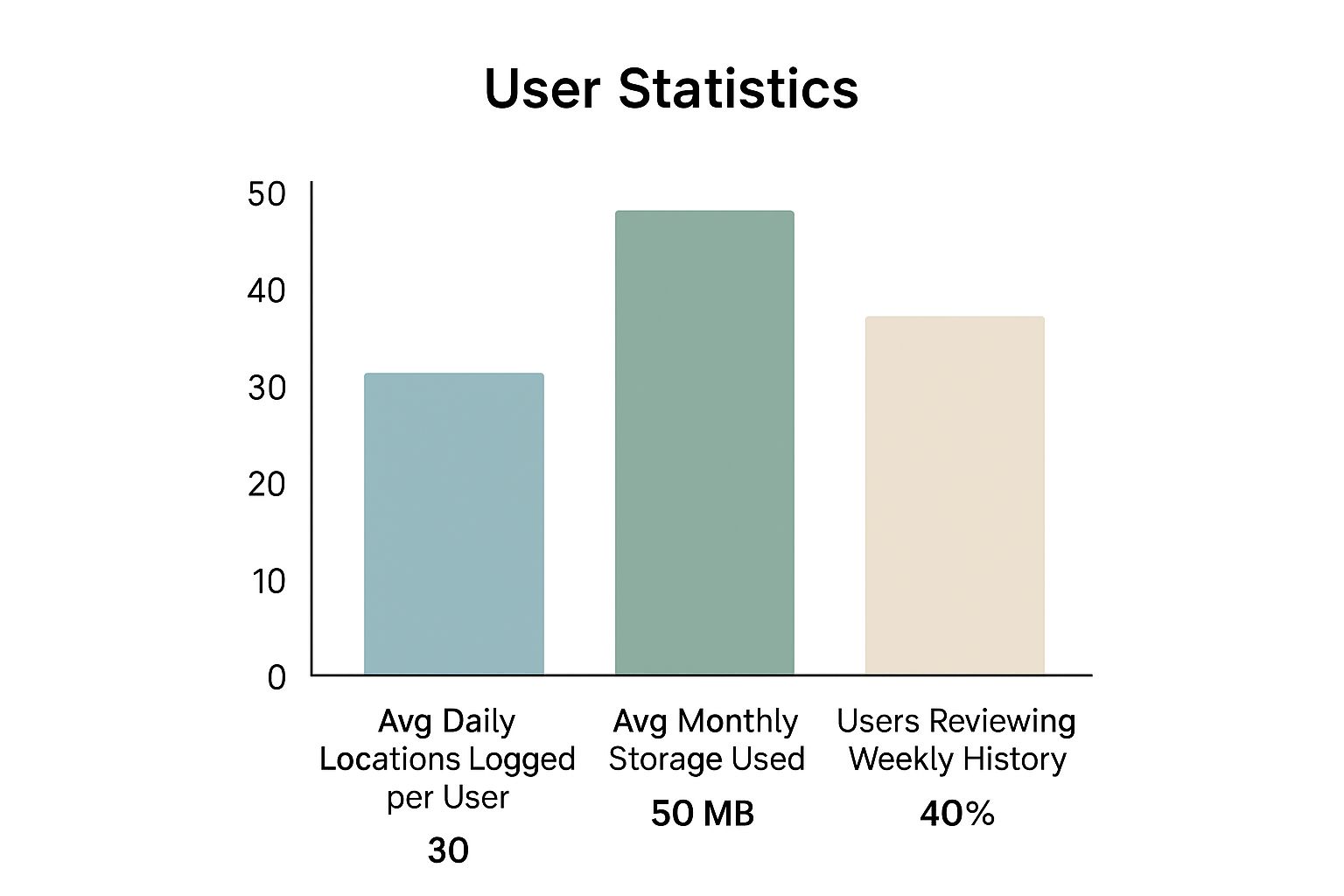
The infographic above visualizes key data regarding how frequently people track their location history. It shows the average daily locations logged, monthly storage used, and the percentage of users reviewing their location history weekly. This data reveals that a significant amount of location data is generated daily (an average of 30 locations logged per user). However, the storage impact is relatively low (50 MB per month). Also, only 40% of users regularly review their weekly location history. This suggests many might be unaware of the extent of data collection.
By following these steps, you can better understand how various platforms track and store your movements. This empowers you to manage your privacy effectively and make informed decisions about location sharing.
The Modern GPS Tracking Technology
Knowing where you’ve been is just the start. Understanding the technology behind location tracking gives you a new appreciation for its power and its limits. This section explores today’s GPS tracking ecosystem and its impact on everything from logistics to personal navigation.
The Core of GPS Tracking: Satellites and Signals
The heart of modern location tracking is the Global Positioning System (GPS). This network of orbiting satellites transmits precise timing signals. GPS receivers in devices like smartphones use these signals to calculate their position. The receiver measures how long it takes for signals from multiple satellites to arrive. By analyzing these time differences, the receiver pinpoints its location on Earth.
Beyond GPS: Expanding the Reach of Location Tracking
GPS works great outdoors, but its accuracy drops when satellite signals are blocked, like indoors or in cities with tall buildings. That’s where other technologies step in. Wi-Fi positioning uses the unique identifiers of Wi-Fi networks to estimate location, even without a strong GPS signal. Bluetooth beacons, small, low-power transmitters, offer precise location data within a limited range. This makes them ideal for indoor navigation and knowing when you’re near something specific.
Additionally, Assisted GPS (A-GPS) uses cellular networks to get a GPS fix faster. A-GPS can significantly reduce the time it takes for your device to find its location, particularly in areas with weak GPS signals.
Hybrid Tracking Methods: Combining Data Sources for Accuracy
Cutting-edge tracking systems use hybrid methods by combining multiple data sources. Integrating GPS, Wi-Fi, Bluetooth, and cellular data creates more accurate and reliable location information. Imagine a navigation app: it might use GPS on open roads, switch to Wi-Fi positioning in tunnels, and then use Bluetooth beacons inside a shopping mall. This seamless blend of technologies provides the most robust tracking experience. The demand for these location services is constantly pushing this market to grow. The GPS tracking device market is predicted to reach USD 3.98 billion in 2025, up from about USD 3.6 billion in 2024. This growth is driven by the increasing need for real-time tracking and solutions for managing fleets of vehicles. Find more detailed statistics here. Knowing the various technologies behind location tracking helps you understand the potential accuracy of your location history and make informed choices about how you use and share location-based services.
Privacy Controls That Actually Protect You
Taking control of your location privacy isn’t just about flipping switches in your settings; it’s about actively and consistently managing your digital footprint. This means understanding how your location is tracked and using the available tools to control that data. Let’s examine some proven strategies for enhancing your location privacy without losing the convenience of location services.
Managing App Permissions
One of the best ways to protect your location privacy is by carefully managing app permissions. Many apps ask for your location, even when it’s not necessary for their core functions. Review each app’s permissions and only grant location access when absolutely essential. A weather app, for instance, requires your location for accurate forecasts, but a photo editing app likely does not. Selectively granting permissions limits the location data collected by apps.
Location-Based Advertising Controls
Many platforms use your location for targeted advertising. While this can be helpful, it can also feel invasive. Most operating systems and apps offer controls to limit or disable location-based ads. On iOS, you can limit ad tracking in the Privacy settings. On Android, you can opt out of personalized ads in the Google settings. This reduces the amount of ads based on your whereabouts. You can also read more about location data privacy: How to master location data privacy. These controls often provide granular options, balancing personalized experiences with your privacy needs.
Advanced Privacy Settings: Delving Deeper
Many platforms provide advanced privacy settings beyond basic controls, offering even finer control over your location data. Explore the privacy sections of your devices and frequently used apps. Look for options like “Location History Pause,” “Significant Locations Reset,” or “Privacy Checkup.” These features offer powerful ways to manage and even delete past location data. You can also consider using privacy-focused browsers and search engines that minimize data collection.
The growing emphasis on privacy and regulatory compliance has increased scrutiny of location data usage. Specifically, the use of location data, including data from GPS tracking devices, has faced increased scrutiny in 2025 due to this heightened focus on privacy and compliance. Developments like the first federal class action complaint under the Washington My Health My Data Act and investigations by the California Privacy Protection Agency exemplify this trend. Explore this topic further. These legal and regulatory shifts are changing how companies handle location data, highlighting the importance of understanding your rights and the tools that protect your privacy.
Regular Privacy Audits: Staying Proactive
Protecting your location privacy requires ongoing effort. Regularly audit the privacy settings of your devices and accounts. Review app permissions, location settings, and privacy policies. This proactive approach helps ensure your settings align with your preferences and that you’re aware of changes in data collection practices. Staying vigilant and informed allows you to effectively manage your location privacy in our constantly evolving digital world.
Analyzing Your Location Patterns For Personal Insights

Tracking your location history is just the first step. The real value comes from understanding what this data reveals about your daily routines and habits. This section explores how analyzing your location patterns can uncover surprising insights, empowering you to make more informed decisions.
Visualizing Your Movements: Mapping Your Life
Imagine seeing a visual representation of your movements – daily, weekly, or even yearly. Several tools and platforms make this possible. Google Timeline creates a detailed map of your travels, categorizing activities like walking, driving, and cycling. This visual overview can reveal patterns you might otherwise miss.
For example, you might discover you spend a significant amount of time commuting. Or perhaps you’ll find you frequently visit new areas without even realizing it. Apple’s Significant Locations feature, while less visually detailed, provides a list of frequently visited places and the duration of your stays. This helps you understand where you spend most of your time and how your routines evolve over time.
Identifying Frequently Visited Places: Uncovering Your Hubs
Analyzing location data can highlight your most frequented locations. This information can be valuable for a variety of purposes. Understanding your most visited places can help optimize your commute, for instance. You might identify traffic bottlenecks or explore alternative routes.
It can also inform decisions about where to live or work, basing these choices on your actual movement patterns rather than assumptions. This insight can also be helpful for travel planning, allowing you to easily revisit places you’ve enjoyed.
Calculating Time Spent: Understanding Your Time Allocation
One of the most revealing aspects of location data analysis is understanding your time allocation. By calculating the time spent at different locations, you gain valuable insights into your lifestyle and productivity.
For example, are you spending more time at work than intended? Are you dedicating enough time to hobbies and personal pursuits? This data can be revealing, prompting you to reassess your priorities and adjust your routines.
To help you choose the right tool for your needs, the table below summarizes some popular options:
Location Data Analysis Tools and Features
This table provides an overview of tools available for analyzing personal location history data, highlighting their key capabilities.
| Tool/Method | Data Sources | Key Features | Cost | Privacy Level |
|---|---|---|---|---|
| Google Timeline | Google Location History | Detailed maps of movements, activity categorization | Free | Moderate |
| Apple Significant Locations | iPhone Location Services | List of frequented places, duration of stays | Free | High |
| Location History Visualizer | GPX, KML, CSV files | Customizable visualization options | Varies | Depends on source |
This overview helps you understand the variety of options available for understanding your location data. Each tool offers unique features and privacy considerations. Choosing the right tool depends on your specific needs and comfort level with data sharing.
Recognizing Data Anomalies: Ensuring Accuracy and Security
While location data provides valuable insights, it’s important to be aware of potential data anomalies. Unexpected location entries or gaps in your history could indicate tracking errors or security concerns.
For example, if your location history shows you somewhere you’ve never been, it could indicate a GPS glitch or, in rare cases, unauthorized access. Regularly reviewing your location history and addressing discrepancies is essential for maintaining accuracy and security. This proactive approach can help identify and correct potential issues.
By understanding how to analyze your location history, you can unlock valuable insights into your daily life, ultimately leading to better decisions about your time, travel, and overall well-being.
Advanced Security Strategies For Location Privacy
Protecting your location privacy is a continuous process. It requires vigilance and a proactive approach to security. This guide outlines practical steps for safeguarding your location data without compromising the convenience of location services.
Recognizing Unauthorized Location Access
One of the first steps in protecting your location data is recognizing the signs of unauthorized access. Unexpected battery drain, unusual data usage, and apps requesting unnecessary location permissions can all indicate a problem. For example, a photo editing app typically doesn’t need your location. If you encounter these red flags, review your app permissions and location settings in your device’s settings.
Setting Up Alerts and Notifications
Utilize built-in security features that offer alerts for suspicious activity. Platforms like Google and Apple allow you to configure notifications for logins from new devices or unusual locations. This means you’ll receive an alert if someone tries to access your account from an unfamiliar place, enabling you to take immediate action. These alerts act as an early warning system for your digital security.
Implementing Layered Security Measures
Don’t depend on just one security measure. Employ layered security by combining strong, unique passwords with two-factor authentication (2FA) and regular software updates. Each layer adds another barrier, making unauthorized access significantly more difficult. Regularly reviewing and updating these security practices is crucial for protecting your location data.
Managing Location Data Breaches
Even with the best security practices, breaches can still happen. Knowing how to respond effectively can mitigate the impact. If a breach occurs, change your passwords immediately, review your account activity, and report the incident to the appropriate authorities. Swift action is essential for containing the potential consequences.
Secure Location Sharing With Family and Friends
Sharing your location with loved ones can be helpful, but it’s important to do so securely. Use trusted apps and platforms that prioritize privacy, and be selective about who you share your location with and for how long. Regularly review your location sharing settings to ensure they align with your preferences.
Future-Proofing Your Location Privacy
Technology and security threats are constantly evolving. Stay informed about emerging risks and adapt your security strategies. This could involve using privacy-focused apps and browsers, exploring new security features on your devices, or even adjusting your online behavior. Staying informed and proactive helps you maintain control over your location data.
Ready to take control of your location history and improve your travel journaling? Acti, an intuitive iOS app, automatically logs your visits and helps document new destinations seamlessly. Download Acti now!
Leave a Reply