Understanding Digital Memory Keeping

Let’s be honest, our digital lives are a mess! Photos scattered across devices, files lost in the cloud, and old hard drives collecting dust. Our precious memories are everywhere and nowhere at the same time. Digital memory keeping is the solution. It’s more than just storage; it’s about intentionally organizing this digital chaos into a meaningful archive. This ensures our memories and the stories they tell are accessible and cherished for years to come.
The Challenge of the Digital Deluge
Traditional methods of memory preservation, like photo albums and scrapbooks, simply can’t handle the sheer volume of digital content we generate. Think about how many photos you take on your phone each week. Now multiply that by years, even decades! The scale of the problem becomes crystal clear. This isn’t just a personal problem; it’s a global phenomenon. By 2025, we’re projected to capture a mind-boggling 2.1 trillion photos globally, which equates to 61,400 photos every second. This explosion of digital content highlights the urgent need for effective digital memory keeping strategies. Find more detailed statistics here. Plus, navigating the various platforms and devices where our memories reside adds another layer of complexity.
Transforming Chaos into Legacy
Thankfully, families are discovering innovative ways to tackle this digital deluge and transform overwhelming collections into organized, accessible treasures. This isn’t about buying a bigger hard drive; it’s about creating systems. Think of it as building a library for your life. You wouldn’t just toss books onto shelves haphazardly. You’d categorize them, create a catalog, and make finding specific titles a breeze. Digital memory keeping applies these same principles to your photos, videos, and other digital artifacts. You might be interested in: How to master travel journaling with a dedicated app.
Practical Steps for Building Your Digital Legacy
Beginning your digital memory keeping journey can feel daunting, but it doesn’t have to be. By breaking it down into smaller steps, you can start building your digital legacy without feeling overwhelmed.
Consolidate your scattered memories: Gather your photos, videos, and other digital files from all sources, including phones, cameras, cloud storage, social media, and old hard drives.
Organize your collection: Create a logical folder structure and naming convention for easy file retrieval. Consider organizing by date, event, or person.
Back up your data: Follow the 3-2-1 backup rule: 3 copies of your data, on 2 different media types, with 1 copy offsite. This safeguards against data loss due to hardware failure, theft, or disaster.
Curate and share: Don’t just store your memories; interact with them! Create albums, slideshows, and digital stories to share with loved ones.
These initial steps build the foundation for a robust digital memory keeping system. As you become more comfortable, explore advanced techniques like metadata tagging and specialized software. This ensures your digital memories are not only preserved but also easily accessible and enjoyable for generations to come.
Why Digital Memory Keeping Is Booming Right Now
The world of memories is going digital, and it’s happening fast! More and more, we’re realizing how important it is to preserve our digital heritage. This isn’t just a fleeting fad; it’s a fundamental shift in how we create, interact with, and cherish our memories. There are several key factors driving this exciting surge in digital memory keeping.
The Rise of Digital Natives
The first big factor is the rise of digital natives. Millennials and Gen Z have grown up with digital documentation as a core part of their lives. Photos, videos, and social media posts aren’t just add-ons to their memories; they are the memories themselves. This inherently digital existence demands effective organization and preservation. Many are turning to solutions like cloud storage and dedicated memory keeping apps to manage their ever-expanding digital footprint.
Aging Populations and Family Histories
Another key driver is the growing number of people looking to preserve family histories. Many are realizing that physical photos and documents are fragile. They’re turning to digital memory keeping as a way to ensure these precious stories survive. This demographic shift is fueling the demand for professional digitization services that can carefully convert physical artifacts into digital formats. It’s not just about convenience; it’s about protecting irreplaceable memories from the passage of time.
Artificial Intelligence: A Game Changer
Meeting this increased demand are incredible advancements in technology. Artificial intelligence (AI) is revolutionizing how we organize and access our digital memories. AI-powered tools can automate tasks like photo tagging, facial recognition, and even create highlight reels! What was once a tedious chore is now becoming simple and efficient. Imagine effortlessly searching through thousands of photos for a specific event or person. AI is making that a reality.
The Expanding Market
The growing need for digital memory keeping is clearly reflected in the market itself. The digital memory keeping industry, especially digital photo scanning services, is experiencing phenomenal growth as people worldwide seek to preserve their personal histories. In 2025, the digital photo scanning service market was valued at about $367.5 million, and it’s projected to keep growing, potentially reaching several billion USD by 2033. This incredible growth demonstrates a significant shift in how we value and prioritize our memories, indicating a long-term commitment to digital preservation. Check out these market statistics!
The Future of Memory Keeping
The digital-first mindset of younger generations, the desire to preserve family histories, the rise of AI, and the expanding market are all coming together to create a perfect environment for the digital memory keeping industry. This convergence suggests a future where preserving our digital heritage isn’t just an option, but a necessity. New tools and services are constantly emerging, making it easier than ever to capture, organize, and share our memories. As we continue to embrace digital life, digital memory keeping will undoubtedly become an essential part of how we tell our stories and share our legacy for generations to come.
Choosing The Right Cloud Storage For Your Memories
Cloud storage has completely changed how we save our digital memories. But with so many services available, picking the right one can feel a bit overwhelming! This section will guide you through the different options, helping you make a smart choice that perfectly fits your needs.
Understanding Your Storage Needs
Before we explore specific platforms, let’s figure out how much storage space you actually need. Think about what kinds of files you’ll be saving. Photos and videos, for example, take up way more space than documents. Consider your current digital library and how much it might grow. Will you be scanning old photos or mainly storing new ones? Planning ahead like this will help you avoid headaches down the road and ensure you select a service with enough room for all your memories.
Key Features for Memory Keeping
Not all cloud storage is the same! While many services offer basic file storage and sharing, keeping digital memories benefits from some extra-special features. Look for services with awesome photo organization tools, such as automatic tagging and album creation. Facial recognition is another fantastic feature that makes finding photos of specific people incredibly easy. And if you want to share your memories with loved ones, look for platforms with seamless sharing and collaboration options. Of course, strong security measures are essential, too, like two-factor authentication and encryption.
Comparing Popular Cloud Storage Providers
To get a better idea of the cloud storage landscape, take a look at the infographic below. It shows the user adoption rates of three leading digital memory keeping platforms – giving us some insight into popular choices available!
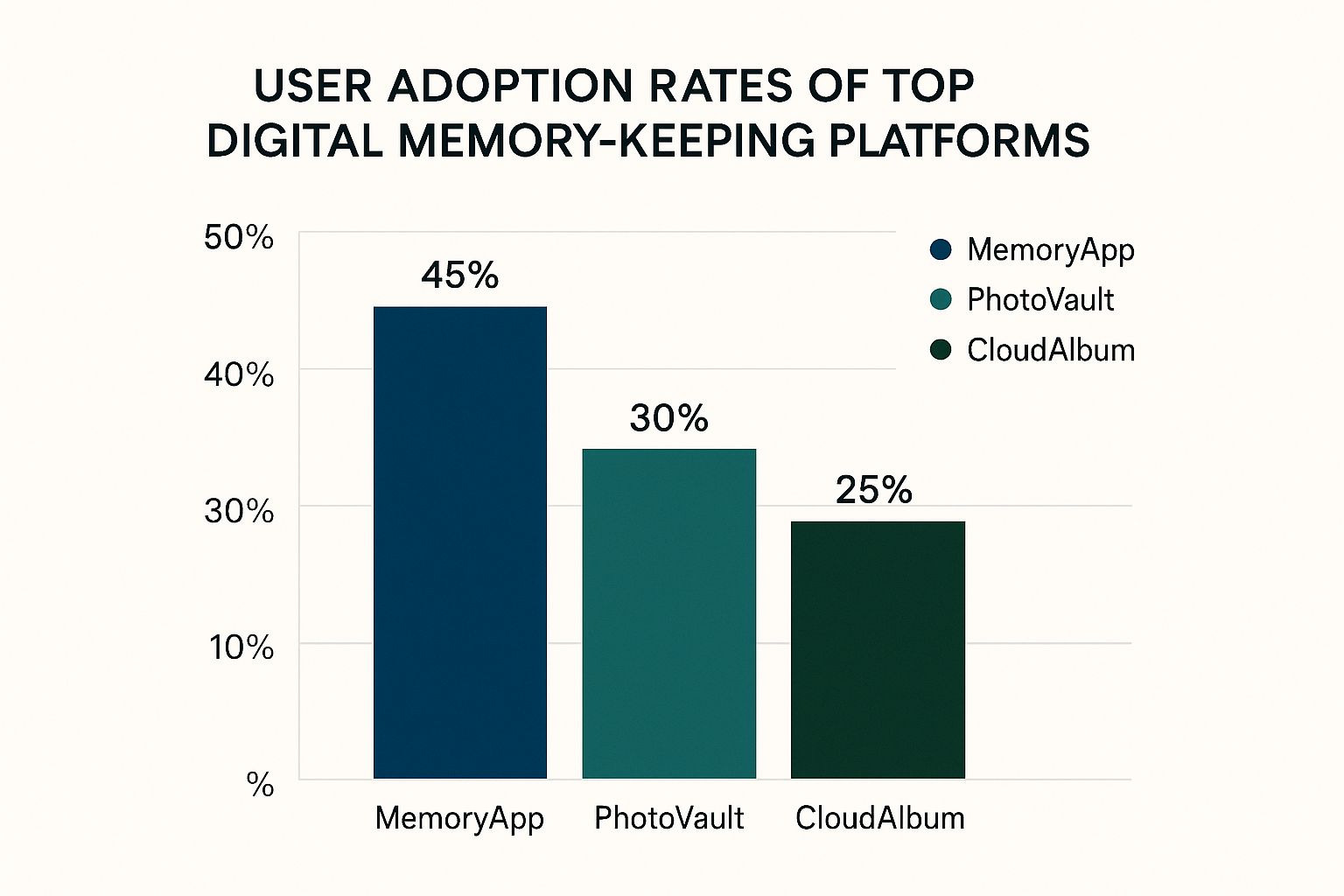
As you can see, MemoryApp is the most popular, boasting a 45% adoption rate. PhotoVault follows at 30%, with CloudAlbum rounding out the top three at 25%. This popularity suggests these platforms offer great features and are easy to use, making them strong contenders for your digital memory keeping needs. But remember, popularity isn’t everything! Personal cloud storage has exploded in the past decade, growing from 1.1 billion users in 2014 to an estimated 2.3 billion in 2025. Learn more about this incredible growth. This increasing reliance on cloud storage really shows how vital it is for preserving our digital lives.
To help you compare different services, check out the table below:
Popular Cloud Storage Services Comparison: A detailed comparison of major cloud storage providers including storage capacity, pricing, security features, and features specific to memory keeping.
| Service | Free Storage | Monthly Price | Key Features | Best For |
|---|---|---|---|---|
| MemoryApp | 5GB | $2.99/100GB | Excellent photo organization, facial recognition, sharing options | Families, avid photographers |
| PhotoVault | 2GB | $4.99/200GB | Strong security features, robust sharing and collaboration tools | Security-conscious users |
| CloudAlbum | 15GB | $1.99/50GB | Affordable, large free tier, basic photo organization | Budget-minded users |
This table provides a quick overview of some popular options. Be sure to visit the individual websites for the most up-to-date information and detailed feature comparisons.
Security and Reliability
Your digital memories are priceless, so security and reliability should be at the very top of your list! Choose providers with a proven track record of keeping data safe and services running smoothly. Research their security protocols and see if they’ve had any security breaches in the past. Also, think about how long the platform has been around. You want a service you can trust to protect your memories for years to come. Thinking carefully about these things ensures your precious moments are safe and sound.
Pricing and Value
Cloud storage pricing can be all over the map. Some services offer generous free plans, while others require paid subscriptions. Figure out exactly how much storage you need and what you can afford to find the best value. Don’t just go for the cheapest option – think about the cost over time and make sure the plan you choose will work for you as your storage needs grow. Protecting your memories is a worthwhile investment, and finding a secure and reliable platform is essential.
Organizing Digital Memories That Actually Make Sense
Tired of endless scrolling through a chaotic mess of digital photos and videos? It’s time to reclaim control and build a digital memory keeping system that truly works. Let’s move beyond simple storage and create a meaningful collection that you and your family can cherish for years to come. We’ll explore some practical and effective ways real families are taming their digital chaos.
Building a Solid Folder Structure
Imagine your digital memories as a well-organized library. Everything has its place, making it easy to find any book, or in our case, any photo or video. A robust folder structure is essential. Ditch the random assortment of files and embrace a logical, chronological system. Organize by year, then month, and finally by event or location. This makes finding specific memories a breeze, even years down the line.
Taming Duplicate Files
Duplicate photos and videos are a major contributor to digital clutter. But deleting them randomly can be risky. You might accidentally delete the best version! A duplicate file finder tool is your solution. These programs identify identical or near-identical files, letting you review and keep only the highest-quality versions. This frees up valuable storage space and streamlines your collection.
The Power of Consistent Naming Conventions
Generic file names like IMG_1234 and Video005 don’t tell you much. Switch to a consistent naming convention that includes relevant keywords. For example, “2025-07-15_Family_Vacation_GrandCanyon_IMG001” is much more informative. This descriptive approach simplifies searching and sorting, allowing you to quickly find specific memories.
Metadata: Your Secret Weapon
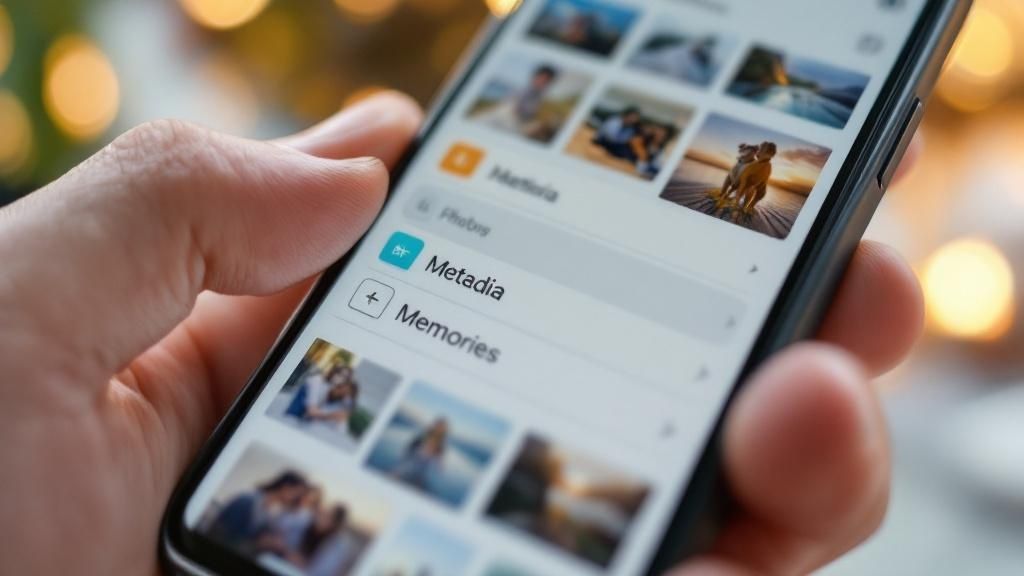
Metadata is the hidden information within your files, like date, location, and camera settings. It’s incredibly useful for organizing and searching. Many photo management programs like Adobe Lightroom let you edit and enhance this metadata. This lets you search for all photos taken in a specific location or timeframe, making metadata your personal memory search engine.
Organizing Different Media Types
Digital memories are more than just photos and videos. They include documents, audio recordings, and even social media posts. Extend your organizational system to encompass all digital media types. Create dedicated folders for each type, apply consistent naming conventions, and consider using journaling apps to capture the stories behind your visuals. You can explore digital journaling further in our article: Learning more about digital journaling in our article. This ensures all your precious memories are easily accessible and preserved. Interestingly, studies show that academics using organized note-taking methods spend 40% less time on literature reviews and cite 35% more sources. Explore this topic further. This proves the power of organization across various fields. By implementing these strategies, you can transform your digital archive from a source of frustration into a cherished legacy for generations to come.
Mastering Digital Scanning Without The Headaches

Turning your boxes of old photos and stacks of documents into digital keepsakes might seem like a huge task, but it doesn’t have to be! With a little know-how, you can make digital memory keeping fun and rewarding. This section offers practical tips to help you digitize those precious memories and make the whole process manageable and enjoyable.
DIY Scanning vs. Professional Services
Your first big decision? DIY or hire a pro? Scanning yourself gives you more control and is often easier on the wallet. However, professional scanning services can offer top-notch quality, especially for fragile or damaged items. Plus, they save you a ton of time and effort.
Smartphone Scanning: A Quick and Easy Solution
For quick digitization of everyday documents and snapshots, your smartphone is a surprisingly powerful tool. Many apps provide features like perspective correction and image enhancement. This means you can get great scans without breaking the bank. Apps like Google PhotoScan and Microsoft Lens put excellent scanning capabilities right in your pocket. They’re perfect for capturing memories on the go or quickly digitizing a handful of important documents.
Investing in Dedicated Scanning Equipment
If you have a larger project or want archival-quality results, a dedicated scanner is a smart investment. Flatbed scanners are versatile and offer high resolution for photos and documents, while photo scanners are designed specifically for digitizing prints and negatives. And for those boxes of old slides and film reels, a slide and film scanner is a must-have. Think about what you need to scan and how much you want to spend before choosing a scanner.
Achieving Professional-Quality Results at Home
Even with a basic scanner, you can get professional-looking results with a few easy tricks. First, clean your scanner bed and the items you’re scanning to remove dust and smudges – this makes a huge difference! Next, choose the right resolution settings. Aim for at least 300 dpi (dots per inch) for photos to capture all the details. For documents, 600 dpi is usually recommended. Lastly, save your scans in the right file format. TIFF is best for archiving because it doesn’t compress and lose data, while JPEG is good for sharing and online storage.
Optimal Settings For Different Materials
Different materials need different scanning approaches. Handle those old photos, especially delicate ones, with extra care and use a lower scanning speed. For important papers, you might need a higher resolution to capture all the fine print. The table below offers a quick guide to recommended settings for different materials.
To help you choose the best scanning method for your needs, we’ve put together a handy comparison table. It outlines the strengths of each method, recommended resolutions, typical cost ranges, and the time commitment involved.
Scanning Options and Recommendations
| Method | Best For | Resolution | Cost Range | Time Investment |
|---|---|---|---|---|
| Smartphone App | Quick captures, convenience | Varies | Free – App Purchase | Minimal |
| Flatbed Scanner | Versatility, home use | 300-600 dpi | $50 – $300+ | Low to Medium |
| Photo Scanner | Photos, negatives | 1200-4800 dpi | $100 – $500+ | Medium |
| Slide/Film Scanner | Slides, film reels | 2400-4800 dpi | $150 – $1000+ | Medium to High |
| Professional Service | High quality, fragile items | Varies | $0.25 – $2+ per image/scan | Low (hands-off) |
With this table as your guide, you can pick the perfect scanning method for your project. Whether you’re a DIY enthusiast or prefer to leave it to the experts, there’s a solution for everyone!
By following these tips, you can ensure your digitized memories look fantastic and your originals are preserved. This careful approach safeguards your precious memories and transforms them into digital treasures you can cherish for years to come. Digital memory keeping isn’t just about preserving the past – it’s about embracing the future of memory preservation!
Bulletproof Security For Your Digital Legacy
Your digital memories are priceless! Imagine losing decades of precious family history to a ransomware attack or a simple hard drive failure. That’s a nightmare scenario, right? That’s why building a robust security plan is absolutely essential for effective digital memory keeping. Let’s explore some proven strategies to protect your precious collection from all kinds of threats, both digital and physical.
The 3-2-1 Backup Rule: Your Memory Safety Net
The foundation of any solid digital preservation strategy is the 3-2-1 backup rule. Think of it as a safety net, catching your memories before they disappear. This rule recommends having three separate copies of your data, stored on two different media types, with one copy stored offsite. This redundancy ensures that even if a couple of your backups fail, your irreplaceable memories are safe and sound.
- 3 Copies: This could be your computer, an external hard drive, and a secure cloud storage service like Dropbox.
- 2 Media Types: Mix it up! Use a combination of hard drives, speedy solid-state drives (SSDs), or reliable cloud platforms.
- 1 Offsite Copy: This protects you from physical disasters like fires, floods, or even theft. A cloud storage service or a hard drive kept at a friend’s house does the trick.
Encryption: Scramble Your Data, Protect Your Memories
Encryption is like scrambling a top-secret message. It makes your data unreadable to anyone without the password. This adds a vital layer of security against prying eyes. Many cloud storage services offer built-in encryption, but you can also encrypt individual files and folders on your computer and external drives for extra peace of mind.
- Cloud Storage Encryption: Reputable providers often encrypt your data both while it’s being transferred and while it’s stored on their servers.
- Device Encryption: Encrypting your computer’s hard drive provides excellent protection against data breaches if your device is lost or stolen.
- File and Folder Encryption: Tools like VeraCrypt let you encrypt specific files and folders, giving you granular control over your data’s security. You might be interested in: Learn more in our article about location data privacy.
Password Management: Unlocking Peace of Mind
Strong, unique passwords are like the keys to your digital kingdom. A password manager can generate and securely store these complex passwords for all your accounts, so you don’t have to remember dozens of different combinations. It’s secure access made simple!
- Password Generation: Password managers create super-secure, random passwords that are incredibly difficult to crack.
- Secure Storage: Your passwords are encrypted and stored in a secure vault, accessible only with your master password.
- Multi-Factor Authentication (MFA): Enable MFA wherever you can. This adds another layer of security by requiring a second form of verification, such as a code sent to your phone.
Regular Maintenance: Keeping Your Backups in Tip-Top Shape
Setting up your backups is a great start, but regular maintenance is essential. Test your backups periodically to ensure they’re accessible and contain the right data. This proactive approach guarantees you can count on your backups when you need them most.
- Backup Testing: Restore a small part of your backup to a different location to verify its integrity.
- Software Updates: Keep your operating system, backup software, and security software updated to patch any security holes.
- Hardware Checks: Check those external hard drives for physical damage and make sure they’re working properly.
Building a Lasting Legacy
Digital memory keeping is an ongoing journey. By implementing these security practices, you’re not just safeguarding files; you’re ensuring that your family’s cherished memories remain safe and easily accessible for generations to come. Think of it like creating a beautifully curated photo album—your digital collection deserves the same care and attention!
Future-Proofing Your Memory Collection
Ensuring your cherished digital memories remain accessible and engaging for generations to come requires a forward-thinking strategy. It’s about more than just storage; it’s about anticipating the long-term impact of file formats, technological advancements, and how your family will connect with your archive. Let’s explore how to build a digital memory keeping system that truly stands the test of time.
Choosing Sustainable File Formats
Just as a strong foundation is crucial for a house, the right file formats are essential for the longevity of your digital memories. Some formats are more robust and adaptable than others. JPEG is a common choice for photos, but it uses lossy compression, sacrificing some image data each time you save. For long-term preservation, consider TIFF or PNG, which are lossless formats, maintaining image quality over time.
For videos, popular formats like MP4 are generally good choices, but using a modern codec like H.264 or H.265 ensures better compatibility with future software. Considering these technical details now will prevent future frustrations.
Migrating Your Collection As Technology Evolves
Technology is ever-changing. What’s state-of-the-art today might be outdated tomorrow. Remember floppy disks? That’s why migrating your collection to newer formats and storage media is key to effective digital memory keeping. Think of it as giving your memories room to breathe in a new environment. If you have photos stored on CDs, transfer them to an external hard drive or a cloud storage service.
Staying current with new technologies and best practices for digital preservation keeps your memories accessible. This proactive approach protects your precious moments from becoming trapped in obsolete formats.
Documenting Your Archive: A Guide for Future Generations
Imagine someone discovering your carefully organized digital archive years from now. Without context, those files are just a collection of images and videos. Documentation provides that context. A guide explaining your organizational system, file naming conventions, and the stories behind your collection adds immense value for future family members. It transforms a simple archive into a treasured family history. Think of it as adding captions to a photo album – the details that bring your memories to life. Include explanations of family traditions, details about events, or simply identify the people in the photos.
Sharing Access Securely and Easily
Sharing digital memories should be simple and secure. Cloud storage services provide excellent sharing options, allowing you to create shared albums or give select individuals access to your collection. Develop a family sharing plan for easy access while maintaining your privacy. Create separate shared folders for different family members or use password-protected links for sensitive materials. This careful approach keeps you in control while sharing your memories. Provide family members with clear instructions on how to access and navigate your collection, making it enjoyable for everyone.
Planning Your Digital Inheritance
Your digital legacy is precious. Planning its inheritance is essential. Specify who will inherit your digital collections, provide access credentials, and outline any specific wishes regarding your memories. Consulting an estate planning attorney helps incorporate your digital assets into your overall estate plan, ensuring your digital memories are handled according to your wishes. This legal framework protects your legacy. You can also provide instructions for managing your online accounts, social media profiles, and other digital assets.
Building a Legacy That Lasts
By focusing on sustainable file formats, migrating your collection, documenting your archive, sharing wisely, and planning for digital inheritance, you create a future-proof system for your digital memories. This proactive approach ensures your collection will remain accessible, meaningful, and treasured by your family for generations. It’s about crafting a living archive that continues to tell your family’s story.
Ready to get started? Acti, an intuitive iOS app, can help! It makes capturing and organizing life’s adventures effortless, preserving your memories and keeping them easily accessible. Download Acti today and start building your digital legacy!
Leave a Reply